

Cloudflare’s Google Tag Gateway Still Injects GTM With “Set Up Tag” Off: Why, and How to Fix It
Table of contents
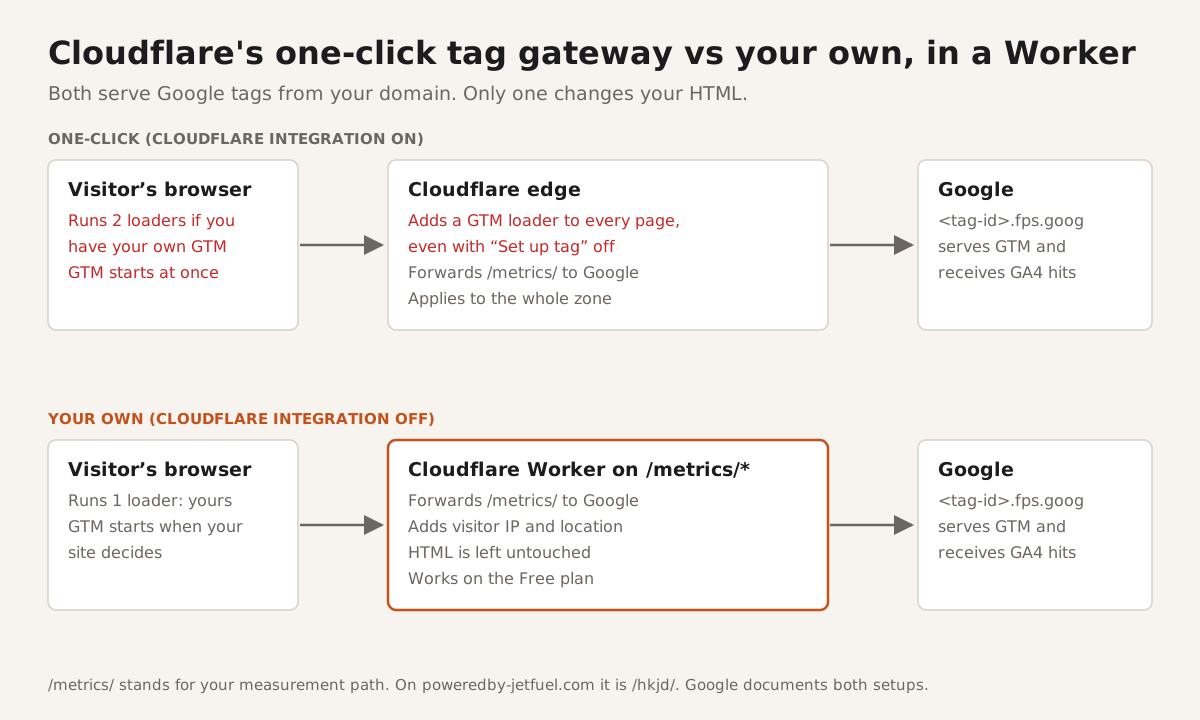
Short answer: with Google tag gateway turned on in Cloudflare, Cloudflare adds its own Google Tag Manager (GTM) loader to the top of every HTML page, even when "Set up tag" is off. If your site already loads GTM itself, the container loads twice, and any delay you built into your own GTM snippet stops working. The only way to stop the injection is to turn Cloudflare's Google tag gateway off. You can keep first-party tracking by running the gateway yourself in a Cloudflare Worker, following Google's manual setup guide.
We found this on our own site while fixing page speed. Below: how to check if it's happening to you, what it cost us, and the exact fix, with the code. Everything here was tested in October 2026; if Cloudflare changes how the gateway works, we'll update this page.
What does Cloudflare's Google tag gateway inject into my pages?
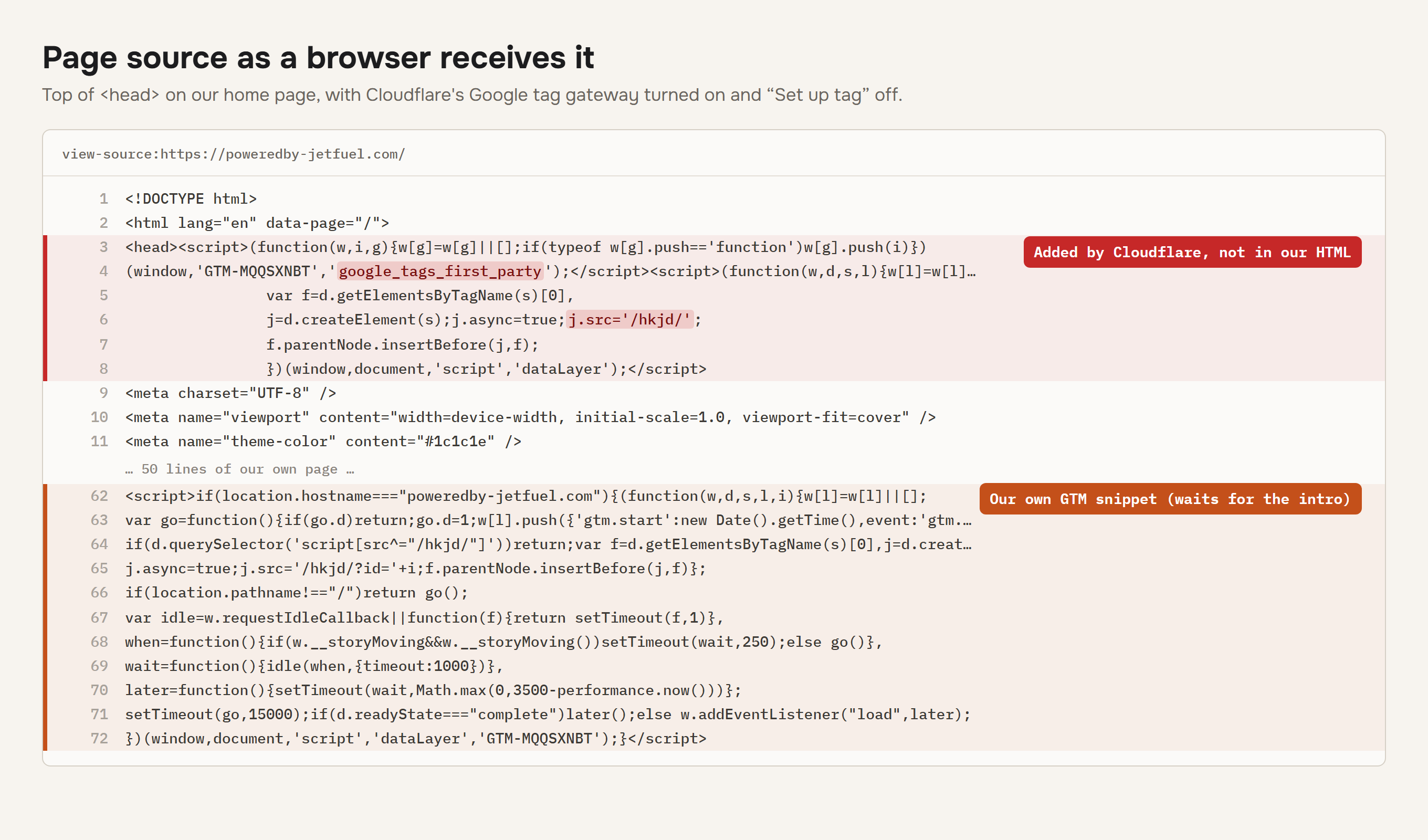
Two inline scripts, at the very top of <head>, on every HTML page that a browser requests. This is what Cloudflare added to ours (your tag ID, measurement path and developer ID will differ):
<script>(function(w,i,g){w[g]=w[g]||[];if(typeof w[g].push=='function')w[g].push(i)})
(window,'GTM-MQQSXNBT','google_tags_first_party');</script>
<script>(function(w,d,s,l){w[l]=w[l]||[];(function(){w[l].push(arguments);})('set', 'developer_id.dY2E1Nz', true);
  var f=d.getElementsByTagName(s)[0], j=d.createElement(s);j.async=true;j.src='/hkjd/';
  f.parentNode.insertBefore(j,f);
})(window,document,'script','dataLayer');</script>
The second script loads your Tag Manager container from your measurement path (/hkjd/ on our site; yours is the path Cloudflare assigned (or the one you set), often something like /metrics/). The container then loads the Google tag library.
Why can't I see the script with curl or in my HTML files?
Cloudflare only adds it to responses that look like a browser loading a page. A plain curl request doesn't get it, and it isn't in your files or your server's output, because Cloudflare inserts it on the way out. That is why some site owners on Cloudflare's forum thought their site had been hacked: they found a strange script loading /eryh/ or /ous4/ that their own code never wrote.
To see what browsers get, send browser-like headers:
curl -s --compressed \
  -A "Mozilla/5.0 (Windows NT 10.0; Win64; x64) AppleWebKit/537.36 (KHTML, like Gecko) Chrome/140.0.0.0 Safari/537.36" \
  -H "Accept: text/html" -H "Sec-Fetch-Dest: document" -H "Sec-Fetch-Mode: navigate" \
  https://example.com/ | grep -c google_tags_first_party
1 means the loader is there; 0 means it isn't. Or open your site in Chrome, open DevTools, and run this in the Console:
'google_tags_first_party' in window
Doesn't turning off "Set up tag" stop it?
No. In our tests and in Cloudflare's own community forum, the loader stays with "Set up tag" off. A Cloudflare staff member confirmed there in May 2025 that the toggle doesn't control whether the script is injected, only part of what it contains. Re-saving the setting didn't change it for us either. Cloudflare support told us there is no setting, Configuration Rule or page rule that keeps the gateway on and stops the injection; Cloudflare's documentation also says Configuration Rules can't disable it.
The only switch that removes it is turning off Google tag gateway itself: Cloudflare dashboard, Web tag management, your domain, Google Tag Gateway tab, Update Configuration, switch the Turn on Google tag gateway toggle off, Save. That also turns off the first-party path, so read the Worker fix before you do it.
Does Google Tag Manager load twice with Cloudflare's tag gateway?
If your site has its own GTM snippet, usually yes. Cloudflare's documentation says the injected tag overrides an existing GTM script; on real sites both run. We saw the container requested twice before we added a check, and other developers have reported the same: two copies of GTM on every page, Google's tag library downloaded twice and flagged by PageSpeed, and duplicate-pixel warnings from tags inside the container.
A quick check in the DevTools Console:
performance.getEntriesByType('resource')
  .map(e => e.name)
  .filter(n => n.includes('gtm.js') || n.includes('/metrics/'))   // use your own path
More than one container request (from googletagmanager.com, your gateway path, or both) means it's loading twice.
Does Cloudflare's Google tag gateway slow down my site?
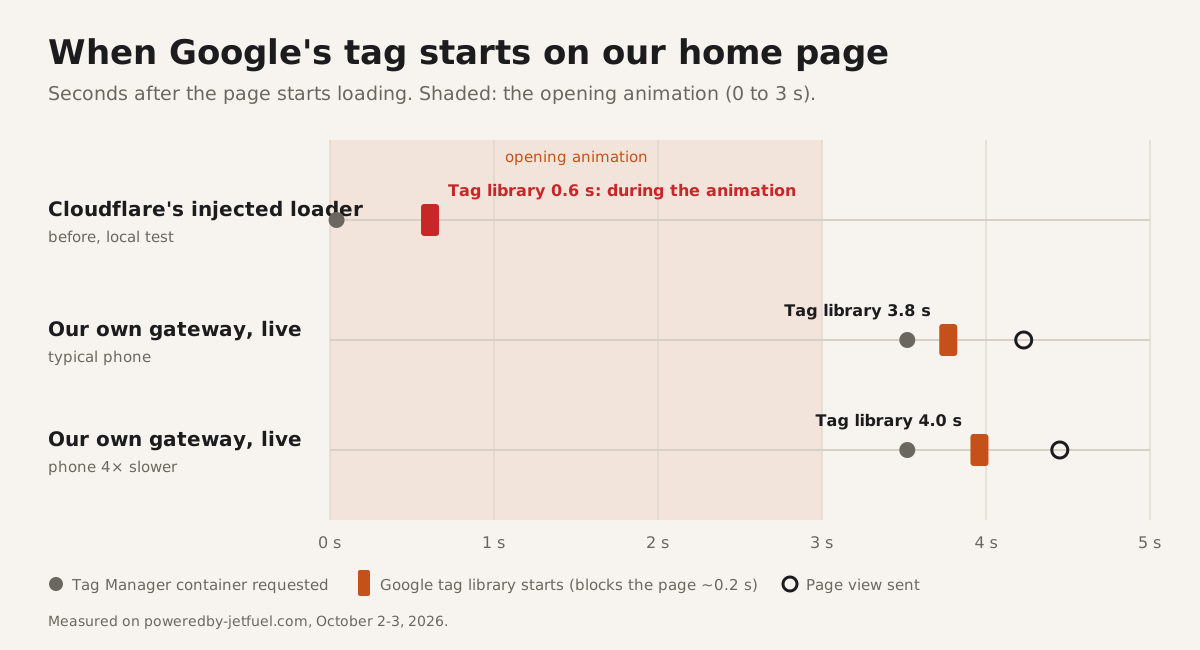
It can, a lot, if you load GTM late on purpose. The injected loader starts Tag Manager immediately, so a deferred or delayed GTM snippet no longer delays anything. Google's tag library blocks the page for roughly 160 to 205 ms when it starts on a mid-range phone. On our home page that landed in the middle of the opening animation and held back the Largest Contentful Paint (LCP), the moment the main content finishes drawing.
What we measured in the lab
On our home page (Lighthouse mobile, median of 3 runs on a local build with Google's real tag files, simulated throttling, which is what PageSpeed Insights uses):
| Setup | Score | LCP | When the tag library starts |
|---|---|---|---|
| GTM loads at once (before) | 77 | 5.8 s | about 0.6 s |
| Our snippet delays GTM, but Cloudflare's loader still on | 81 | 5.1 s | about 0.6 s (the loader ignores our delay) |
| Our snippet delays GTM, Cloudflare's loader gone | 93 | 3.0 s | about 3.8 s, after the animation |
Live PageSpeed Insights results
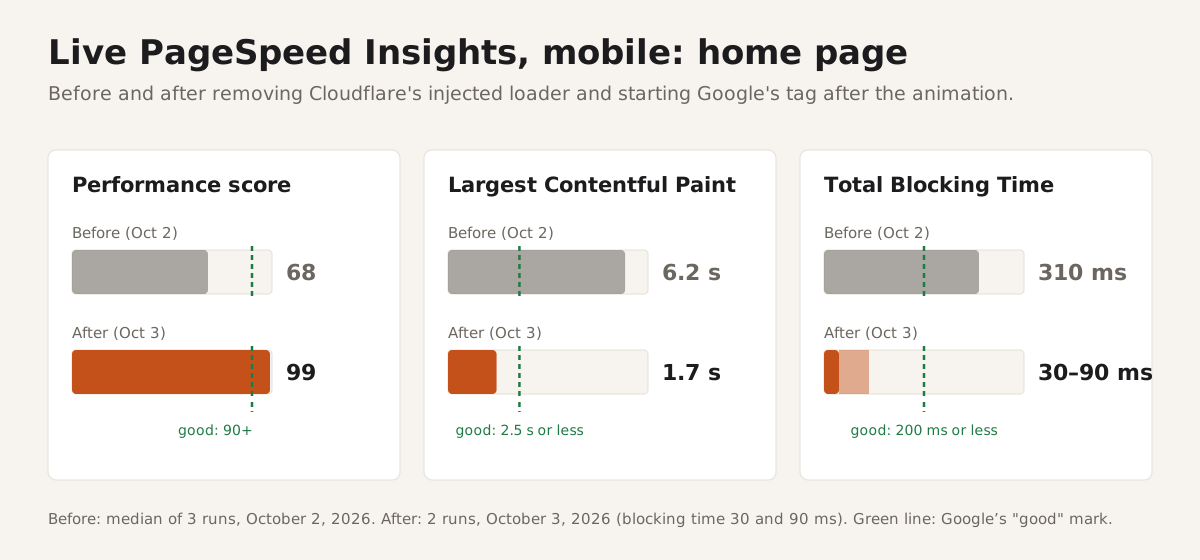
Mobile, for the home page: 68 before, 99 after. LCP went from 6.2 s to 1.7 s and Total Blocking Time (TBT) from 310 ms to 30 to 90 ms. (Before is the median of 3 runs on October 2, 2026; after is 2 runs on October 3. The page looks and moves exactly as before.)
If your site loads GTM straight away anyway and you don't care when it starts, the speed cost is smaller: mostly the duplicate download.
How do I stop Cloudflare from injecting Google Tag Manager?
There are three ways. Only the third stops the injection and keeps first-party tracking with full control over when GTM loads.
Which setup does what
| Setup | GTM copies per page | When GTM starts | Served from your domain | Extra Worker requests |
|---|---|---|---|---|
| Your own GTM snippet, no gateway | 1 | When your snippet runs | No (googletagmanager.com) | None |
| Your snippet plus Cloudflare's one-click gateway | 2 | Right away, top of the page | Only Cloudflare's copy | None |
| Cloudflare's loader only (your snippet removed) | 1 | Right away, top of the page | Yes | None |
| Both, but yours skips when Cloudflare's is present | 1 | Right away (Cloudflare's copy) | Yes | None |
| Your own gateway in a Worker (our fix) | 1 | When your snippet runs | Yes | About 5 to 8 per visit |
Your three options
- Let Cloudflare's loader be the only one. Remove your own GTM snippet. Simplest, and it ends the duplicate. You lose control over when GTM starts, and it always starts at the top of the page.
- Keep both, but skip yours when Cloudflare's is present. Add
if(!document.querySelector('script[src^="/metrics/"]'))(your path) before your snippet inserts its script. Ends the duplicate; still no control over timing. - Turn off Cloudflare's integration and run the gateway yourself in a Worker. Ends the duplicate, gives you full control over timing, and keeps first-party tracking. This is what we did, and it follows Google's own manual setup guide. Step-by-step instructions below.
How do I run Google tag gateway myself with a Cloudflare Worker?
Turn off Cloudflare's integration, then route your measurement path to a Worker that forwards each request to Google at <your tag ID>.fps.goog with the visitor's IP and location. Four steps, below.
Google's manual setup guide describes this setup, including a Cloudflare example. A Worker does the same job on any Cloudflare plan, including Free.
Step 1: Create the Worker
Replace gtm-xxxxxxx with your container ID in lowercase (for GTM-ABC123 use gtm-abc123).
// Google tag gateway, self-hosted on a Cloudflare Worker.
// Route it to example.com/metrics/* (your measurement path).
const UPSTREAM = 'https://gtm-xxxxxxx.fps.goog';

// Never pass on connection headers, or location and IP headers we set ourselves.
const DROP = /^(host|connection|keep-alive|transfer-encoding|content-length|accept-encoding|expect|te|upgrade|proxy-.*|authorization|x-forwarded-.*|x-real-ip|forwarded|cf-.*|cdn-loop)$/i;
// Header values must be plain ASCII ("Zürich" becomes "Zurich").
const ascii = (s) => s.normalize('NFKD').replace(/[^\x20-\x7e]/g, '').replace(/[;=,]/g, ' ').trim();

export default {
  async fetch(request) {
    const url = new URL(request.url);
    const headers = new Headers();
    for (const [k, v] of request.headers) if (!DROP.test(k)) headers.set(k, v);

    // Google needs the visitor's IP and location, or GA4 can't place visitors.
    const ip = request.headers.get('cf-connecting-ip');
    if (ip) headers.set('x-forwarded-for', ip);
    const cf = request.cf || {};
    if (cf.country) headers.set('x-forwarded-country', cf.country);
    if (cf.regionCode) headers.set('x-forwarded-region', cf.regionCode);
    if (cf.latitude && cf.longitude) {
      headers.set('x-forwarded-geolocation',
        `latlong=${cf.latitude},${cf.longitude}` + (cf.city ? `;city=${ascii(cf.city)}` : ''));
    }

    // Same path and query, same method and body (hits can be POST).
    const hasBody = request.method !== 'GET' && request.method !== 'HEAD';
    const res = await fetch(UPSTREAM + url.pathname + url.search, {
      method: request.method, headers, body: hasBody ? request.body : undefined, redirect: 'manual',
    });
    return new Response(res.body, res);   // Google's answer, untouched
  },
};
Step 2: Add a route for the Worker
Route the Worker to example.com/metrics/* (Workers & Pages, your Worker, Settings, Domains & Routes). Keep the path prefix: Google writes it into the scripts it sends back.
Step 3: Point your GTM snippet at the path
In Google's standard snippet, change the script address to your path, as Google's guide shows:
j.src='/metrics/?id='+i+dl;
Leave the <noscript> iframe pointing at googletagmanager.com; the gateway doesn't serve it. Now you can also decide when this snippet runs (we start it after our intro animation, when the page is idle).
Step 4: Turn off Cloudflare's Google tag gateway
Use the dashboard path above. Once it's off, requests to your path reach your Worker instead.
How do I check that my own tag gateway works?
Google provides two checks; both should answer ok:
https://example.com/metrics/healthy: the path reaches Google.https://example.com/metrics/?validate_geo=healthy: the visitor's location reaches Google. If this one fails, your Worker isn't sending the location headers and GA4 will show "(not set)" for city and region.
Then:
- Run the curl check from earlier. It should print
0: the injected loader is gone. - In DevTools, Network tab: one request to
/metrics/?id=GTM-..., none to googletagmanager.com/gtm.js, and GA4 hits going to/metrics/...on your own domain. - In GA4 Realtime: page views arriving, with real cities and regions.
What are the trade-offs of running the gateway yourself?
More requests on your Worker plan and a bit of code to look after, in exchange for control over when GTM loads. In detail:
- Requests: every tag file and tracking hit is now a Worker request. On our site that is about 5 to 8 per visit. The Workers Free plan allows 100,000 requests a day; Cloudflare's built-in gateway doesn't count toward that.
- Visitor IPs: the Worker sends Google the visitor's IP, as the one-click gateway and a normal GTM setup do. Leave it out and Google sees Cloudflare's IP instead, which breaks location and IP-based internal traffic filters. Don't log it.
- Maintenance: it's your code now. If Google changes the gateway's requirements, you update the Worker. Check Google's manual setup guide when something stops working.
- Undo: turning Cloudflare's Google tag gateway back on restores the one-click setup at once.
FAQ
Is the Cloudflare tag gateway script malware?
No. A script at the top of your page that loads a short random path like /eryh/ or /ous4/ and mentions google_tags_first_party is Cloudflare's Google tag gateway. It appears when the gateway is turned on for your domain, even if you never set up a tag.
What does the "Set up tag" toggle actually do?
It changes what the injected script contains, not whether it's injected. With it off, Cloudflare still adds the loader that pulls in your container.
Can I disable Cloudflare's Google tag gateway on specific pages or paths?
Not with Cloudflare's settings: the gateway applies to the whole zone, and Configuration Rules can't disable the injection. To control it per page, turn the integration off and load GTM yourself through your own gateway.
Does Google tag gateway improve page speed?
Serving tags from your own domain can save a connection to another domain, but it doesn't make the tag lighter. With Cloudflare's injected loader, GTM always starts at the top of the page, which can hurt LCP and Total Blocking Time, and loads twice if you also have your own snippet.
Will I lose first-party tracking if I turn off Cloudflare's integration?
Only if you don't replace it. A self-hosted gateway (a Cloudflare Worker) keeps tags and hits on your own domain, the same as the one-click version.
Why does my delayed or deferred GTM still load right away?
Cloudflare's injected loader starts GTM on its own, at the top of the page, before your code runs. Your delay only applies to your own snippet.